
Context
Table of Contents
A panic is a distress signal that must be intercepted, interpreted and actioned, just like any other error. The task falls into the category of effective error handling, but with an upgraded severity. This article reviews the library support in Rust to handle panics, with emphasis on recoverability aspects with provisioned support to derive actionable insights at runtime, when in-flight, all while ignoring the redundant and irrelevant verbosity.
Causing a panic!
Both the standard and the core libraries have implementation support to cause panics, via a macro. Evolved from the core, the recommended approach when building with Rust is to leverage the support from standard library.
The following code sample demonstrates how to raise a panic, and available options, using macro from respective modules:
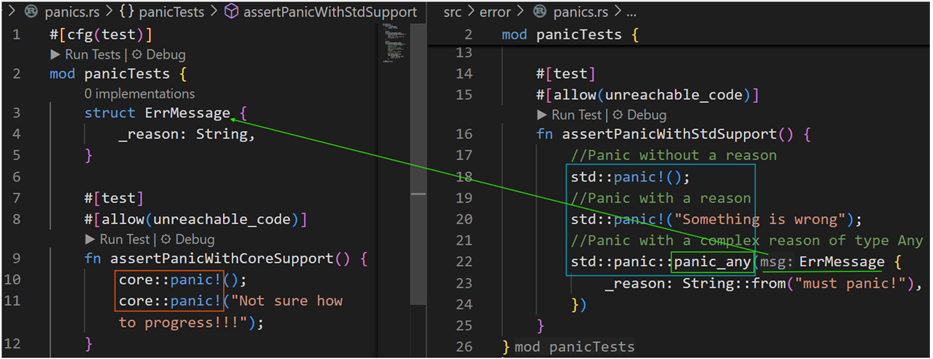
Of a special interest is the panic_any method! Instead of raising a panic with some string type reasoning, a custom type with comprehensive context can be provided as a panic reference. The handlers can then infer necessary detail and set forth appropriate forward relaying.
At a high-level, a panic flow is comprised of the following components:
- A handle to raise a panic; commonly referenced one being the `panic!` macro.
- A hook that intercepts the thread panics and reacts to them. A hook invocation being a part of the panic runtime process.
- A panic runtime that acts to a panic on a thread, orchestrating the flow according to the configured objectives – abort or unwind.
Panic Orchestration Flow
So, what happens when a panic is raised? The following is a visual representation of the flow:

As you’d notice, the internal paths interleave between implementations in core and std, leaning towards a centralized dispatch functionality from the standard library. In case of an immediate abort, the code flows through common intrinsic support in signaling the failure with a SIGABRT exit signal. While the flow doesn’t necessarily cover the entire implementation detail, it’s an attempt to set some visual context.
Few aspects worth mentioning:
- Default dispatch flow – In the default behavior, the code flows invoke a default hook when dispatching the panic. It essentially prints the panic message with a detailed backtrace i.e., call-trace that led to the panic.
- Locking behaviors – Internal code flows use locking behaviors to detail with a multithreaded scenario. For example, you can observe such behavior to initiate writing out the backtrace.
- Optimizations – Considering Rust binaries get deployed to different platform architectures, the internal code flows are optimized to skip certain actions, such as invoking a default hook where writing to stderr doesn’t necessarily print anything.
- Don’t Inline panic support – Inlining panics that don’t result in immediate abort can cause code bloat. Certain critical path functions in the panic manifestation are marked with inline(never) configuration attribute. If you are going to extend, for example with your own custom hook, etc., consider not to inline panic handling.
Additional reference – while ironing out the internals to draw useful pointers for a customized error handling need, I’ve tapped into the Rust community for additional help. Here’s the corresponding GitHub Issue #140970.
Default Hook
One of the orchestration steps involves a call to the registered panic handler. The default handler, for example, has one objective – gather and print a formatted backtrace. The backtrace is from the current thread that panicked. The panic runtime depending on the configured strategy will either terminate or unwind with an opportunity, back to the call-site for potential remediation or recovery (see the section on Unwinding Panics below).
The following are a few useful additional information about the default behavior:
- Environment settings RUST_BACKTRACE or RUST_LIB_BACKTRACE can impact ability to capture backtrace. A forced capture support is available in the Backtrace API.
- In case of a default handler, it first asserts the BacktraceStyle, before proceeding with a print action.
- In certain cases, printing to standard error doesn’t necessarily print anything. In such scenarios, the default handler skips formatting the payload.
Graceful Cleanup
The panic runtime doesn’t impact the broader runtime’s ability to automatically drop pointer references (to heap allocated values). Like any other references from a given scope, once the control from the scope concedes, the runtime implicitly invokes the drop function. The same can be observed with custom types implementing the Drop trait.
The following is an example call stack to show calls to drop_in_place calls for some pointer references on the stack:
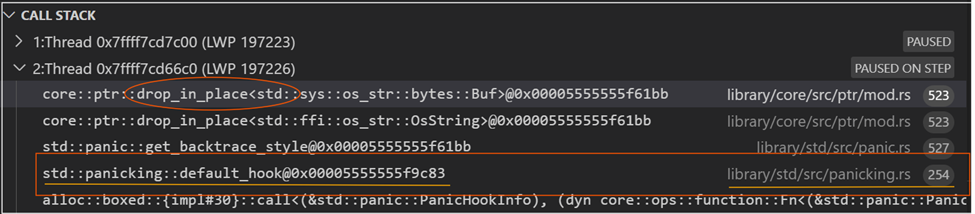
By adding the Drop trait implementation, custom types can define necessary clean-up actions, prior to returning back to the call-site i.e., the drop actions by the runtime. Here’s an example:

The following is the associated call stack example, where you’d notice a call to the ErrMessage’s drop function (at line#17) is made:

Unwinding Panics
The catch_unwind support from the standard library allows the call-sites to capture panics and apply necessary remediation. The following code demonstrates such an application:
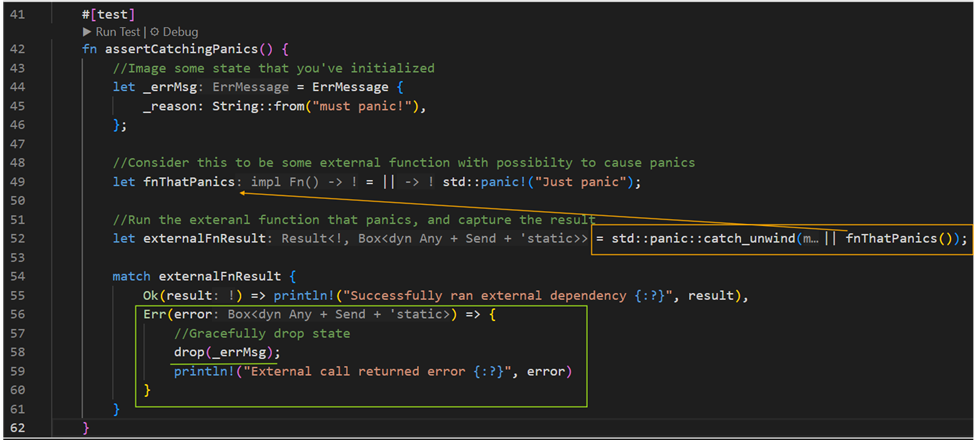
The catch_unwind method is sort of like a catch clause in a Java or Scala’s `try…catch` construct; with the drop method filling in for the `finally` clause. It is also important to note that not all panics can be captured via this method. A panic hook can provide some fallback options to collect relevant and useful information (cannot be used to recover the state).
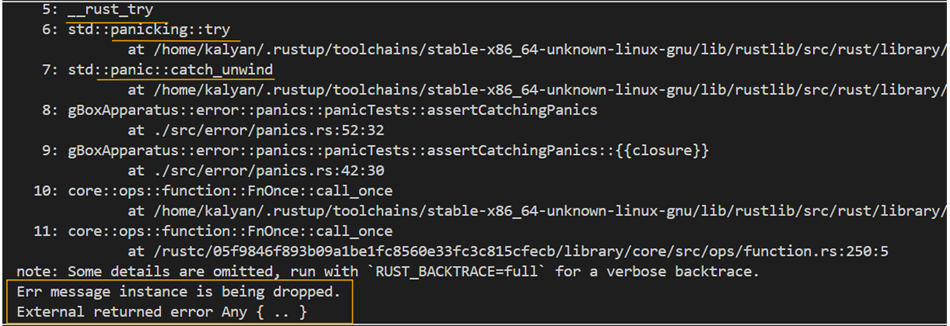
As you’d notice from the following back trace output, the line#58 in above code gets an opportunity to apply necessary clean-up action:
Trace collection with Backtrace
Default Behavior
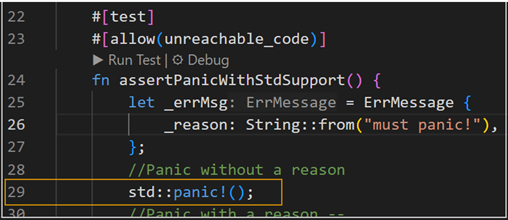
When the code panics, the default handler prints a nice call trace (associated with current thread) in a descending order up-to and beyond the line of code that caused the panic. Let’s review this with a code sample, as shown in the following snippet (reference line#29):
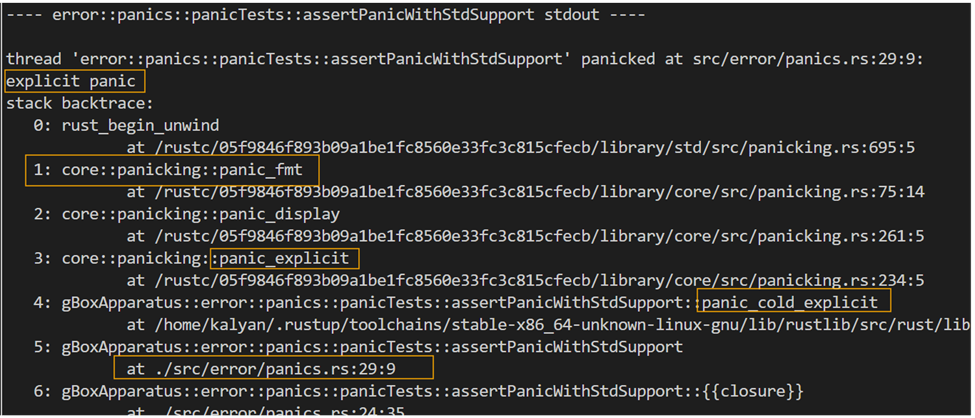
With reference to the orchestration flow as shared above, the sequence narrows down to a call to the panic_fmt method, as shown in the following back trace sample (position#1):
Case for Inflight Trace Collection
The following are a few reasons to justify the need to collect actionable traces, while in-flight (i.e., when the application hasn’t been terminated yet):
- The default trace output though well-formatted and ordered is too verbose.
- It has redundant and not so relevant entries that are of interest for any observability end point.
- For example, call trace of the panic runtime panic_explicit à panic_fmt à and so forth!
- We are interested in the line that raised the panic, for example position #5, from the application code.
A typical log parser would see the same trace output as a sequence of unrelated discrete entries. Unless it or some downstream analyzer applies some heuristic to recognize events in their complete sense or might force for multiple passes over the captured telemetry. For example, setting begin and end markers, etc. The approach can quickly get cumbersome with too many permutations and combinations to deal with before deriving at a clear signal. Such an approach is offline and becomes a second brain without appropriate context.
There’s a better way to help address this ambiguity associated with such offline complex inference efforts – using a custom hook that enables handlers with additional metadata. We often see such aspects to go unattended and as hopeful future technical debt items.
Custom Hook for Actionable Traces
A custom hook is a boxed dynamic closure that can be registered using the set_hook interface from the std::panic module. The hook signature expects the closure to receive a PanicHookInfo type value.
Words of Caution:
- A hook is a global resource. There can only be one registered hook at any given point of time for the duration of the program.
- It’s important to factor in downstream usage to avoid any breaking changes due to rendering format changes by the replaced hook or its ability to emit some trace.
- Consider a light-weight implementation, sort of quick interpretation followed by some fire-n-forget logic. Keeping long on a panic flow doesn’t make sense, as it doesn’t from ignoring the useful indicators there-in.
- To avoid loss of data, some form of localized fault-tolerance can be included in the hook’s logic. This will help generic extractors across the system to periodically fetch and relay the signals to relevant observability end points.
Here’s one purposefully produced side-effect of a bad hook implementation, that thinks it must panic:

The following is a cleaner example of a custom hook that intends to capture relevant detail:
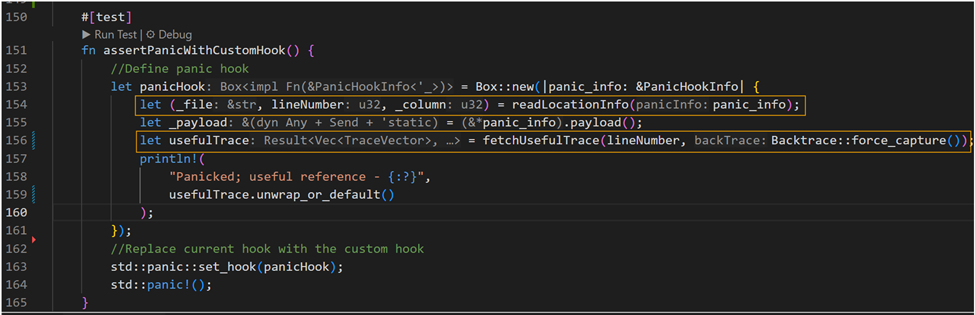
As you’d notice from the above code snippet, line#154 gathers location reference to line of code that raised the panic. Further, using the available reference it captures and filters the Backtrace to extract the specific cause. The result is mapped to a custom type – TraceVector{fnName, file, line}.
Note that the formatted output from a backtrace is in JSON5 format, with some non-JSON prefixes removed. Using the JSON5 Ser-De (has a dependency with the Rust SerDe framework), the parsed results can be directly mapped to some defined types. A very handy crate to avoid additional boiler plate or to deal with JSON parsing intricacies.
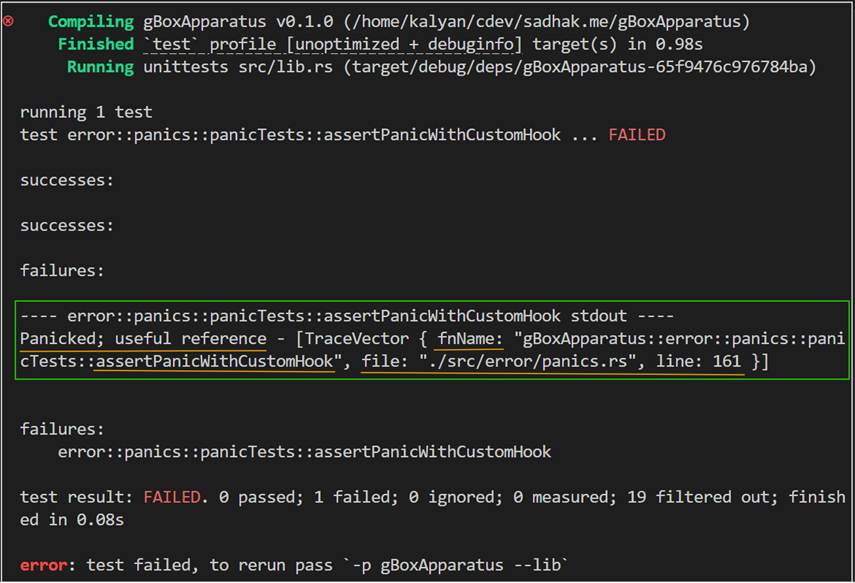
For brevity, I’ve skipped the auxiliary details from the above code sample. The following is an example detail that delivers just the signal that I’m interested in, i.e., the line that raised a panic:
Closing thoughts!
As an advocate of user-first principle, gushing out MVPs without observability fundamentals can cause adverse impacts on overall COGS. Handling panics and extracting actionable insights as part of Effective Error Handling, all while ignoring the redundant nonfunctional aspects helps improve both the end-user experience (expectations), and the first-responder utility. With comprehensive indicators, without many lookups or running around, it allows muster essential stakeholders from get-go. Thus, avoiding a need for engage the big hammer as a first immediate step!
While there’s more room for perfection in the approach, the objective here is to have a provisional foundation to infer actionable data as part of code that deals with fault-tolerance and reliability aspects of a system. All when in flight, and before the application terminates.
Hope the readers like it and thank you for surviving this far in the article. As always, I will be glad to hear via linked social channels from the footer.